Agileday MCP for people operations: Time reporting, absences, and consultant workflows

Use Case: Submitting time reports
For most consultants, time reporting is not the work. It is the administrative task that comes after the work. Necessary? Yes. Loved? Not exactly.
And from an operations perspective, delayed or incomplete time reporting creates real problems:
- Revenue recognition gets delayed
- Project visibility becomes inaccurate
- Billing slows down
- Managers spend time chasing consultants for updates
Every professional services firm understands this challenge. Consultants are busy delivering value to customers. Logging into another system at the end of the week is rarely a priority.
The old way
Even with modern Professional Services Automation (PSA) systems, the process still typically looks something like this:
- Log into the PSA platform
- Navigate to time reporting
- Review allocations
- Fill in hours manually
- Submit the timesheet
With Agileday, much of this is already streamlined through connected allocations and intuitive workflows. But consultants still need to access the PSA and switch context from the tools they use to deliver customer value.
With MCP
With Agileday MCP, consultants can log, fill, copy, edit, and submit time reports directly through tools like ChatGPT, Claude, Copilot, or even an internal Slack bot using natural language.
Instead of opening a separate platform, the consultant simply prompts: “Fill and submit my timecard for this week.”
Agileday MCP already understands:
- Current project allocations
- Assigned customers and projects
- Working time context and national holidays
- Relevant operational rules
The AI can automatically generate entries based on allocations, show a preview of the weekly timecard, update or adjust specific entries, copy previous timecards when relevant, and submit the completed timecard for approval.
The consultant reviews the generated entries, makes adjustments if needed, and submits. All without leaving the AI tools and workflows they are already using throughout the day.
In practice, this becomes especially powerful through conversational tools like Slack, where consultants can complete operational tasks inside the same environment they already collaborate in every day. The entire workflow can happen in a single conversation.
Take a look:
Why it matters
This is not just about making time reporting faster. It is about reducing operational friction.
Consultants want to focus on delivering customer value, not navigating administrative systems. The easier operational tasks become, the more consistently they get done.
For firms, that means:
- Faster and more accurate billing
- Better operational visibility
- More reliable project financials
- Less manual follow-up from managers and operations teams
- Higher quality data across the business
And because Agileday already connects staffing, projects, allocations, financials, and people data together, the context behind the time reporting already exists.
That is what makes the experience different from standalone time tracking tools. The AI is not operating in isolation. It understands the consultant’s actual operational context.
Beyond time reporting
Once operational workflows become accessible through MCP, the interaction does not stop at submitting hours.
The same consultant could also:
- Request absences through AI
- Update their skills and profile information
- Identify relevant upcoming project opportunities
- Receive recommendations on skills to develop next
And because Agileday MCP is permission-aware, firms maintain governance and control while making operations dramatically easier for employees.
Use Case: Finding new project opportunities
In many professional services firms, staffing still operates as a largely top-down process. Managers review availability, staffing teams coordinate allocations, and consultants wait to hear what project they will work on next. And when someone is approaching the bench, the process often becomes reactive:
- Phone calls
- Slack messages
- Staffing meetings
- Spreadsheet reviews
- Manual coordination between managers and operations
For businesses, this creates real operational pressure:
- Billable capacity sitting unused
- Delayed project staffing
- Reduced utilization
But from the consultants' perspective, there is another challenge too. Most consultants already know the type of work they enjoy, the skills they want to build, and the industries they want to move toward. Traditional staffing processes rarely make them an active participant in that process.
The old way
Traditionally, consultants often need to wait for staffing managers to contact them about upcoming assignments.
Even in firms with modern operational platforms, the process can still involve manually searching for opportunities, navigating multiple systems, or coordinating through messages and meetings.
With Agileday, consultants can already:
- View their allocations
- Explore upcoming opportunities
- Search for projects matching their skills
- Put their hand up for relevant work
directly inside the platform.
But consultants still need to stop, switch systems, and move away from the AI and collaboration tools they already use throughout the day.
With MCP
With Agileday MCP, those same workflows can now happen conversationally through tools like ChatGPT, Claude, Copilot, or Slack.
Instead of opening separate systems, the consultant can simply ask:
“When does my current allocation end?”, “What upcoming opportunities match my background?”, or “What projects fit my interests and skills?”
Agileday MCP already understands:
- Current allocations
- Skills and experience
- Historical project work
- Customer context
- Future staffing demand
- Organizational operational data
The AI can then identify relevant opportunities, explain why they are a match, summarize project details, and help the consultant take the next step.
Because Agileday already connects staffing, projects, allocations, financials, and people data together, the AI is not operating in isolation. It understands the consultant’s real operational context. And importantly, this is not just structured matching. The AI can take into account broader context like previous experience, historical work, and even future ambitions when identifying relevant opportunities.
Instead of staffing being something that only happens top-down, consultants can become more active participants in shaping what comes next.
Take a look:
Why it matters
This is not just about making staffing workflows faster.
It is about reducing operational friction and making operational systems more accessible inside the tools consultants already use every day.
For firms, that means:
- Faster staffing decisions
- Reduced bench time
- Better utilization visibility
- More empowered and proactive consultants
- Improved alignment between skills and customer demand
- Less manual coordination for staffing and operations teams
For consultants, it means more ownership over their own path. Instead of passively waiting to be staffed, consultants can proactively identify opportunities, explore upcoming work, and participate more directly in shaping their future assignments.
How MCP makes this possible
Agileday already connects the operational core of professional services firms: people and competences, sales pipeline, staffing, projects, time reporting, and financials. Agileday MCP makes all of it accessible to AI in a permission-aware way.
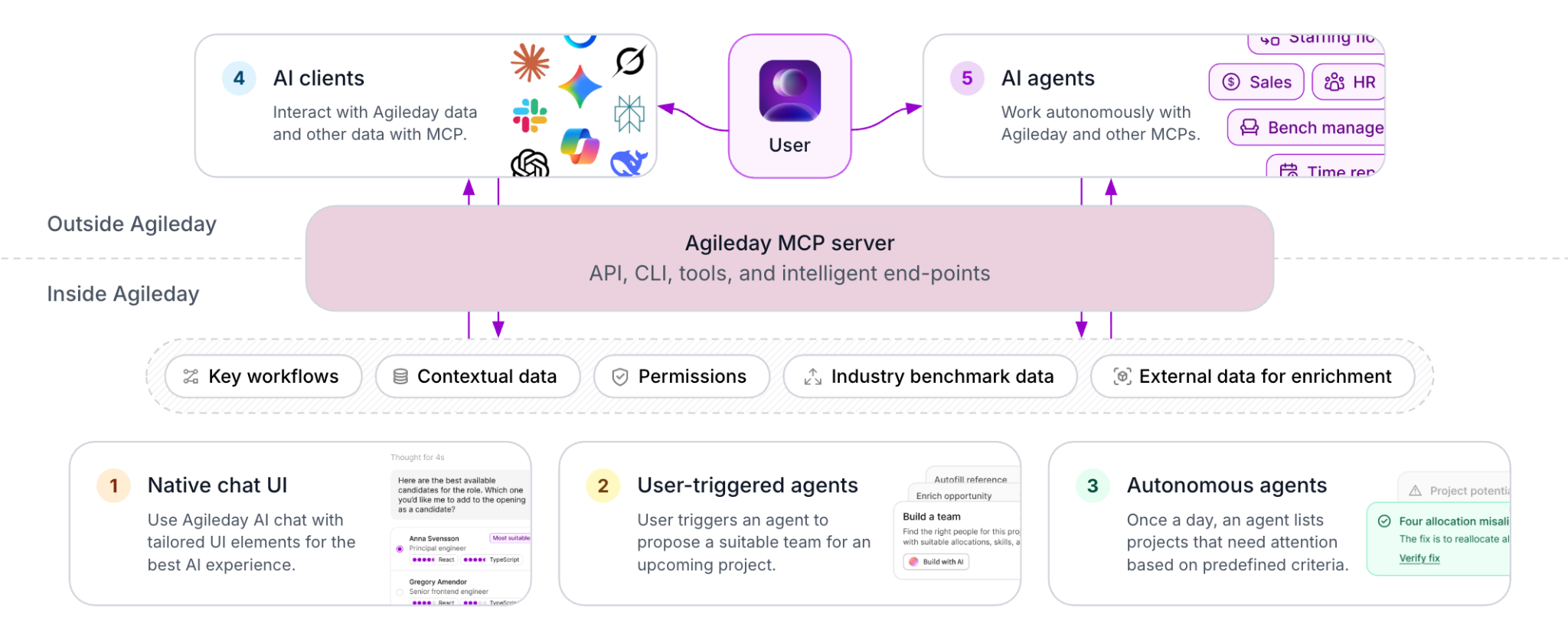
Instead of navigating systems manually, users can interact with operational data using natural language. AI can retrieve the right information, combine structured data such as allocations and availability with operational context, and return outputs that are immediately usable.
At the same time, these interactions can trigger actions directly, such as creating time reports, updating records, progressing workflows, or surfacing missing profile information without requiring separate manual steps.
For automation and agents, firms can also connect custom agents or internal AI assistants to Agileday MCP to support recurring operational tasks or react to events across HR, CRM, financial, or delivery systems.
As more tools adopt MCP, firms can begin building operational workflows that span across multiple systems through AI.
Get in touch to meet our team for a walkthrough to see how the Agileday MCP can reshape how your firm operates.
Let the Agiledays begin.